
Facilities Inventory: OAS Dashboard link to wrong page
Back to Facilities Inventory main page
OAS Dashboard link incorrect page
When you clicked on the given OAS Dashboard link in the step-by-step guide you arrived at a page that did not resemble the one pictured. This happens as a result of your default OAS dashboard setting or due to your browser's history cache. This can be resolved in couple of ways.
If you are in a hurry or do not wish to change your OAS dashboard starting page, then simply click on the dashboard dropdown located on upper right-hand side blue border at the top of the OAS Dashboard page. Figure 1
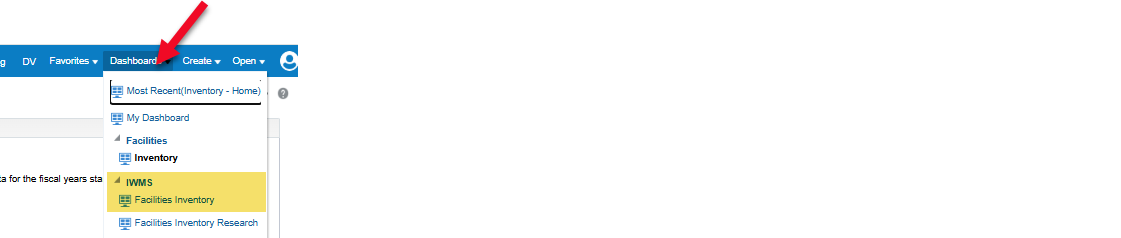
Figure 1 - Location of dashboard dropdown menu highlighting the IWMS-Facilities Inventory selection
If you only use OAS for inventory reporting purposes, FIG suggest that you change your default starting page to the IWMS - Facilities Inventory dashboard.
- Go to the profile icon on the far right of the upper blue line on the OAS Dashboard and click on My Account from the dropdown menu. Figure 2

Figure 2 - Location of My Account in the Profile dropdown
- In the box that appears, on the Preference tab, use the dropdown menu for the Starting Page selection and select IWMS - Facilities Inventory. Click OK to save the changes. Figure 3
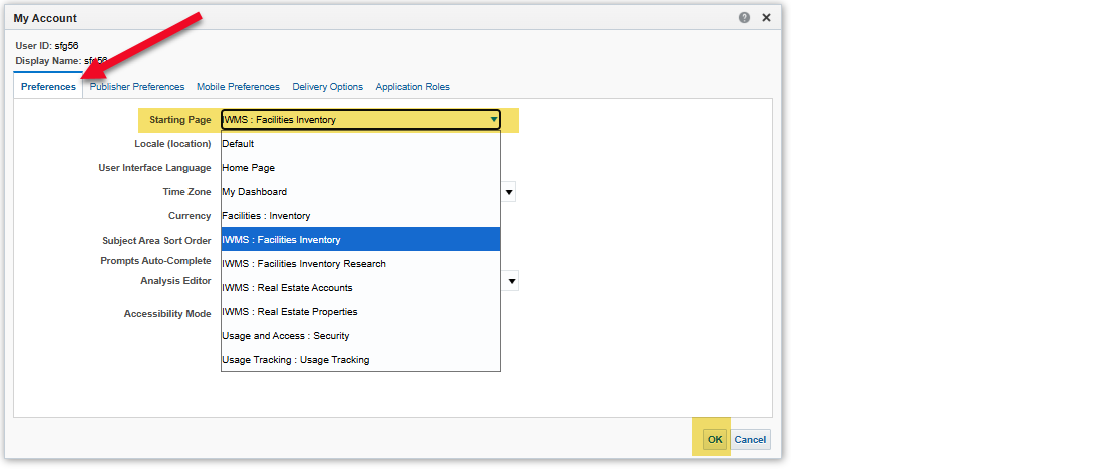
Figure 3 - Starting Page dropdown and selection of the IWMS - Facilities Inventory page