
Facilities Inventory: Moving a Room by Editing the KFS Org Code
To move a room to a different unit within your college and division, you need to edit the KFS org/s associated with the room.
Begin by logging into the facilities inventory system and navigating to the view called "1.40 Room Updates".
Locate the room you would like to move in the list of rooms.
It is not necessary to use the "Edit" button in the list on the top half of the screen to change the KFS org. You can save yourself several clicks by not using that button for these changes.
Click anywhere in the row containing the room listing, except the "Edit" button. The details of the room will appear in the bottom half of the screen as shown in Figure 1 below. In the "Room Details" tab, look for the "Edit" button under the "Room Org Division" heading.
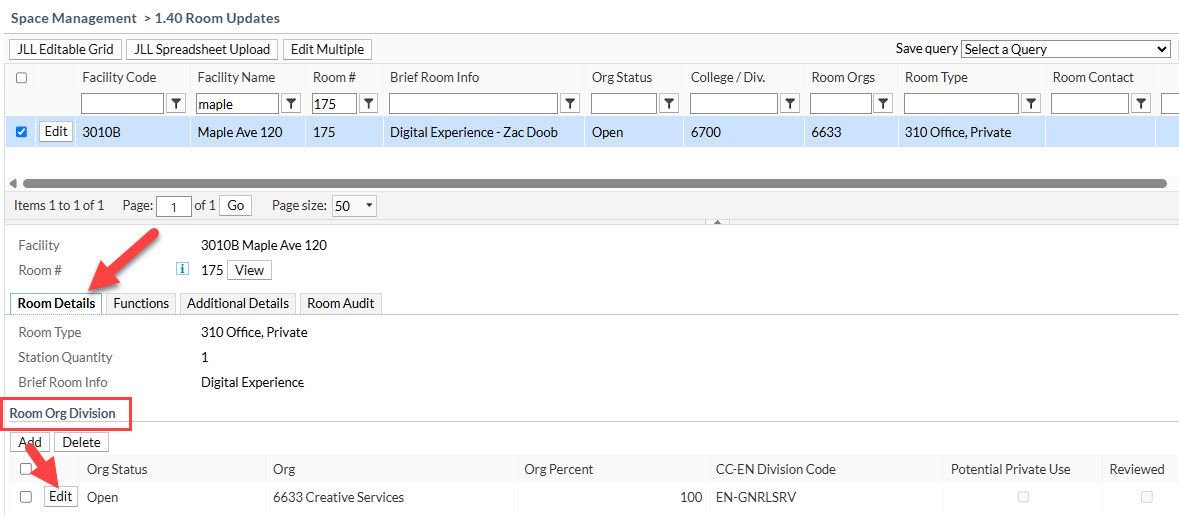
Figure 1. The "Edit" button in the "Room Details" tab under the "Room Org Division" heading is the place to change the unit/s associated with a room.