
Facilities Inventory: Finding Floor Plans
Beginning in the 2023-2024 fiscal year, there are two places where you can find floor plans when your NetID has been granted access.
Requesting Floor Plan Access
If you do not have access to floor plans and need access for your work as staff at Cornell University, please contact the facilities inventory "org admin" for your college or division who will make a request for access to the Facilities Information Group.
Locating Floor Plans
Method One: Printable PDF Floor Plans from the Find Facility Information web pages
Floor plans which are to scale and designed to be printed on 11 x 17 paper are available on the Find Facility Information web pages. If your NetID has been granted access, you will be able to locate available PDF files of the floor plans which have been set to scale for viewing or printing.
On the web page
https://findfacilities-prod.fcs.cornell.edu/searchfacilities
begin by entering part or all of the name of the building for which you would like floor plans. The search is a partial-word search, so if you enter "Olin", you will find all results which contain those letters in the facility name or nicknames.
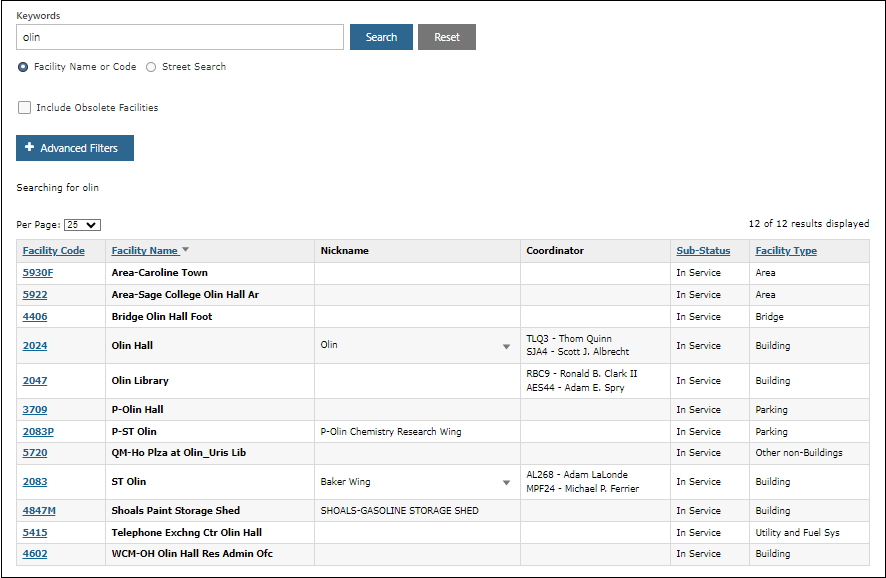
Figure 1. Facility search results for the keyword "Olin".
If you enter "Olin Hall", you will find only those entries which contain in part the complete phrase "Olin Hall" including the space between the words.
The list of search results may contain more than just buildings since the facilities inventory contains other facilities as well such as parking lots, roads, bridges, and geographic areas. Entries which start with "P-" are parking lots, and entries which begin with "**" are facilities which no longer exist. They may have been demolished or sold.
From the list of search results, click on the facility code of the building for which you would like to view floor plans. For example, in the example above, click on the "2047" link to see information about "Olin Library".
There is often a photograph of the building which you can use to confirm you have found the right entry.
Figure 2. Scroll down to find the "Floor Plans" option.
From the list of options, click "Floor Plans". If you have access, you will see a list of PDF file names.
Figure 3. List of PDF floor plans for Olin Library.
There is typically one PDF file per floor. For large buildings, a single floor could be split across several files. For small buildings, several floors may be combined on a single PDF file.
If you do not have access, you will see the
Method Two: Facilities Inventory System Digital Floor Plans
If you have been granted access to the facilities inventory system, you can view floor plans which are attached to the information present in the facilities inventory system. Each year in the late summer, information in the system has been updated to be current for the date of June 30th at the end of the university fiscal year.
Locating a specific floor plan
Log in to the facilities inventory system at https://prod.iwms.cornell.edu with your NetID and NetID password. Access is restricted to Cornell staff and faculty who update the facilities inventory system each year or who need access for their jobs.
From the sidebar on the left side of the screen, select the square icon which looks a little like a floor plan.
Select "Views" and "1.40 Facility".
Searching for a Floor Plan for a Facility
Not all facilities recorded in the facilities inventory system have floor plans. Buildings which are mostly likely not to have floor plans are those where the space is leased and buildings which are still being planned or buildings under construction which have not yet received a certificate of occupancy.
Search for a Floor Plan by Room
To search for a floor plan by locating a specific room, follow steps X-Y above and then select "Views" and "1.40 Room.
The list of rooms you can see in the facilities inventory depends on the kind of access you hav b