
Facilities Inventory: Manual "Bulk Edit" to Change Org Status
One business day after all room changes have been saved in the facilities inventory, go to the Oracle Analytics Server (OAS) Room Information report to download a list of rooms as a spreadsheet. Changes made in the facilities inventory are not saved to Oracle Analytics Server (OAS) reports until the next business day at 7 am.
Select Dashboards > IWMS > Facilities Inventory to see the reports for the 2023-2024 fiscal year. Navigate to the "Room Information" report shown in Figure 1 below.
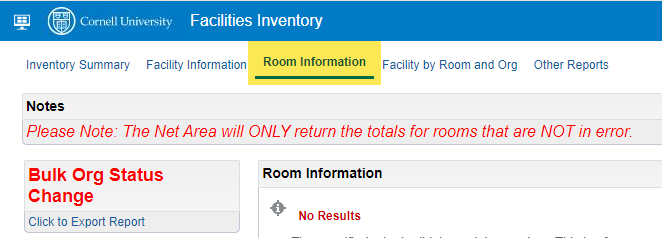
Figure 1. Oracle Analytics Server (OAS) report in the Dashboards > IWMS > Facilities Inventory subject area called "Room Information".
Set the filters to the left of the screen as shown in Figure 2 below.
- Under "Facility", uncheck the “Select” checkbox (green highlight).
- Under "Org", select one or more KFS orgs to limit the room list (yellow highlight). You can use the “More/Search” (red highlight) to open the second box in order to enter multiple KFS org codes at once.
- Select “Apply” at the bottom of the filter section.
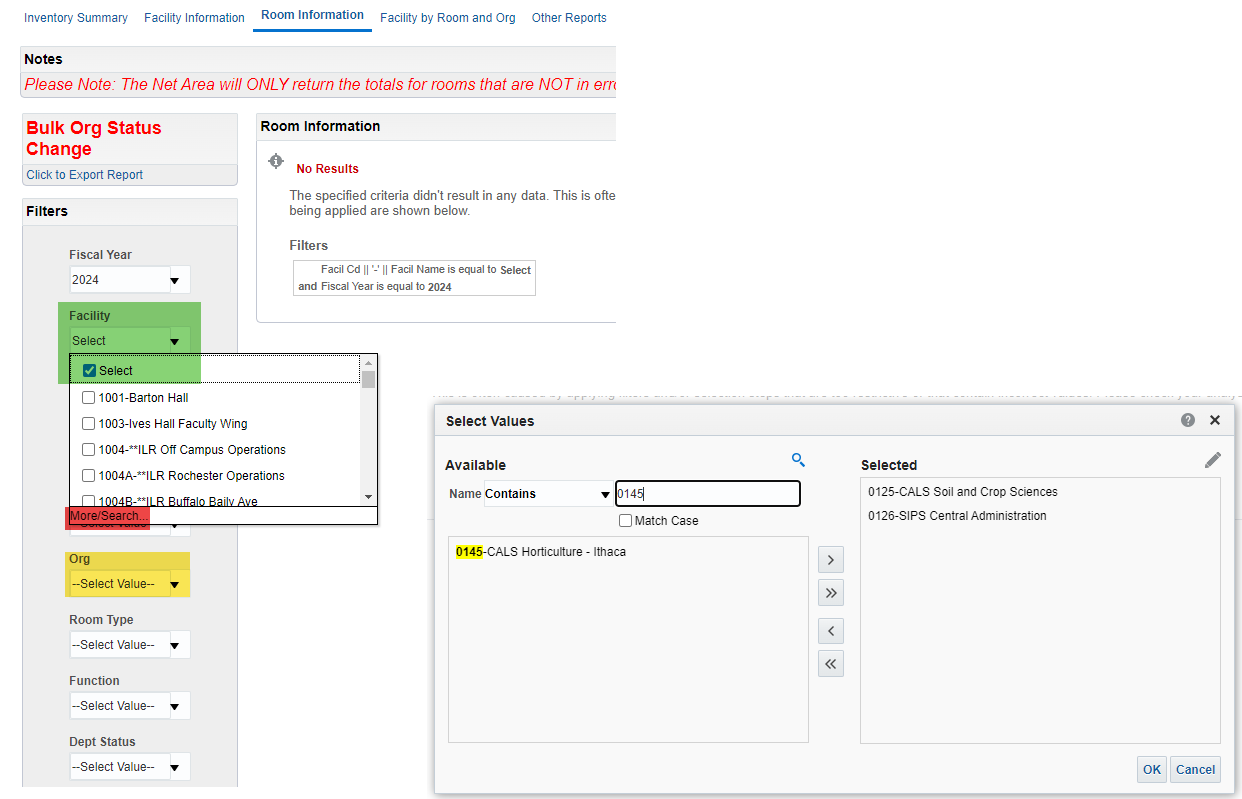
Figure 2. Prepare the search under "Facility" by unchecking the "Select" checkbox, and under "Org" by selecting one or more KFS orgs.
After a short delay, a list of rooms should appear on the screen.
Under "Bulk Org Status Change", use "Click to Export Report" to export the report for updating.
When the report opens in a second window, scroll to the bottom of the report.
- Select Export > Formatted > Excel.
- After saving the spreadsheet to Excel, review the contents of the file, and change the values in the Dept Status Desc column to Approved. Approved is the final status for a room and indicates that all updates are complete. This status was previously called "Frozen".
- Email the modified spreadsheet to the fi-help email address with a subject line: "Org Status Update – KFS org numbers", for example "Org Status Update - 0183, 0191, 0154"
- Once the Facilities Inventory Group has received and reviewed the spreadsheet, we will transfer it to a Box folder and upload the spreadsheet to the facilities inventory system. Once the upload process is complete, we'll ask you to review the results.