
Facilities Inventory: Transferring Rooms to Another Department
Back to Facilities Inventory Documentation
Last updated: March 6, 2024
If you are an inventory user who is not an "org admin" you are likely to need the help of your college or division's facilities inventory "org admin" to transfer a room from one department to another.
These are the steps for performing a room transfer.
1) Determine the four-digit KFS org code of the new department by asking the person who updates the facilities inventory for the new department for their org code, or by consulting a list of KFS org codes available for use in the facilities inventory:
List of KFS org codes [access restricted]
Make sure that the org code you select is marked as "[Active: Y]". There are a small number of retired KFS org codes in the list above marked as "[Active: N]" which should not be used because they have been retired.
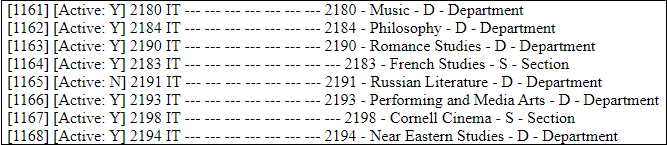
Figure 1. Sample KFS org codes. Only use those listed as "[Active: Y]". In this list, "2191 - Russian Literature" is inactive.
2) If the new KFS org code is in a different college or division and you are the org admin for the room's current college and division, write to the Facilities Inventory help mailbox at fi-help at cornell dot edu, provide the information below, and ask for the room/s to be transferred.
Facility Code: Four numbers, sometimes followed by a letter, such as 1024 or 1080N.
Facility Name: Building name such as "Bailey Hall".
Room Number/s: A list of room numbers such as B09, 10003.
New KFS org code: Four digits such as 0102 or 3424.
Please transfer rooms as early as possible in the inventory cycle to allow time for the new users of the room to update the usage of the room.
If, however, the new KFS org codes is in your college or division and you are an "org admin" for that college or division, then please follow the steps below to transfer the room.
3) Search for the room in the view called "1.40 Room Updates". Key to doing this is turning on the search filter options.
4) Once you have located a room to transfer, click anywhere in the listing of the room in the upper portion of the screen.
5)