
Facilities Inventory: Organized Research OAS Reports
All users of the inventory system are granted access to reports in Oracle Analytics Server, OAS. To use the reports, login to the web page
https://oasprod.db.cornell.edu/analytics
with your Cornell University NetID and NetID password.
After logging in, from the top-right corner of the screen, select "Dashboards". You may have access to a number of different reports other than those related to the facilities inventory.
To find reports for the most current facilities inventory data look under the IWMS category.
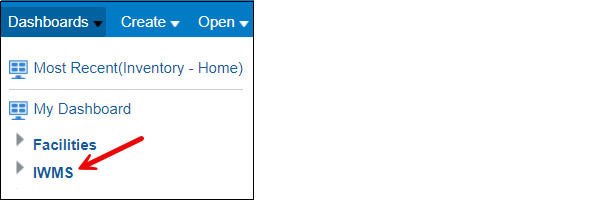
Figure 1. Reports are grouped into subject areas. The most current facilities inventory information is available under the "IWMS" subject area.
To find the reports associated with the process of completing the spreadsheet for substantiation of organized research activities required by the Office of Cost and Capital Assets which is used to record research function code percentages, under the IWMS heading, select "Facilities Inventory Research" as shown in Figure 2 below.
Figure 2. The "Facilities Inventory Research" subject area under the IWMS heading contains two reports needed for organized research substantiation.
Salary Distribution Report
You can use the salary distribution report to help you generate a list of people who are paid by organized research funds.
These instructions generate a spreadsheet.
Select the Fiscal Year
Select the Fiscal Year from the Fiscal Year drop-down on the left side of the "Salary Distribution" report. Each fiscal year runs from July 1st through June 30th. The fiscal year "2025" corresponds to the period from July 1, 2024 through June 30, 2025.
Select the Appropriate College or Division
Units at Cornell each have a college or division. The list of facilities inventory org admins contains a list of colleges and divisions used in the facilities inventory. From the "College" drop-down list, uncheck the "Select" box.
Fix: Change "College" to "College or Division".
Fix: See if can remove the need to uncheck the "Select" box.
Check the box next to one or more colleges or divisions for the report.
Do Not Select a Department
Fix: Change name of drop-down from Department to KFS Org.
The entries in this report contain a value for the KFS org. For a number of your researchers, the org code listed is not likely to correspond to the org code you use in the facilities inventory and so if you filter the report by KFS org code, you will not receive a list of the people whose locations and activities need to be reported to the Office of Cost and Capital Assets.
Filter by Higher Education Function Codes
Generate the Report Results
Scroll down on the left sidebar and click the "Apply" button.
Change the Report Data
In the middle of the top of the report results, change the drop-down from "Totals by Netid"
Fix: Change "Netid" to "NetID".
to "Details by Account".
Export an Excel Spreadsheet
Scroll to the bottom of the results window. (Do not need to see all on screen to export all).