
Facilities Inventory: (Optional) Adding People to Rooms
The Cornell University facilities inventory requires this information for all of the more than 65,000 rooms in the system:
- A room type
- For many room types, a station quantity
- One or more KFS orgs to describe the unit/s using the room
- For each KFS org, a CC/EN code to describe the ...
- Percentages to describe how much each unit uses the room
- One or more function codes to describe how the room is used
- Percentages to describe how much of each of the specified function code/s describe the room.
The only spot where the inventory requires information about the people associated with a room is if one or more occupants of the room use the room for activities associated with organized research. In the approximately X rooms in the system like this, then it is necessary to add the NetID of a person who is the contact for the details about the organized research activities.
In all other cases, it is not necessary to specify who has used the room during the fiscal year in the facilities inventory system. You can save yourself a considerable amount of time by not entering any information about who uses a room.
It may be convenient to do so though. Here are several places you can add optional information about the users of a room. Note that if you do begin to enter this information, please be prepared to keep the details current each year as many people view this information and may expect it to be current if it is present.
Room Description in Brief Room Info
On the view called "1.40 Room Updates" where inventory users review, approve and modify the descriptive information about a room, there is a place to enter a short comment about the room. This can be a useful place to describe the room so that it is easy to distinguish the room from other rooms in the list. Clear descriptions here can speed up your ability to update the rooms.
You could enter the name of the person who has been using the room for example " " as shown in Figure 1 below.
[Example of the name of person in the room]
Figure 1. Example "brief room info" containing the last name of the occupant of the room.
A better practice is to enter a description of the work done by the occupants of the room so that the description is more likely to remain current and require fewer updates over the years. Figure 2 shows an example of a room where the brief room info describes how the room is used and not the specific names of occupants of the room.
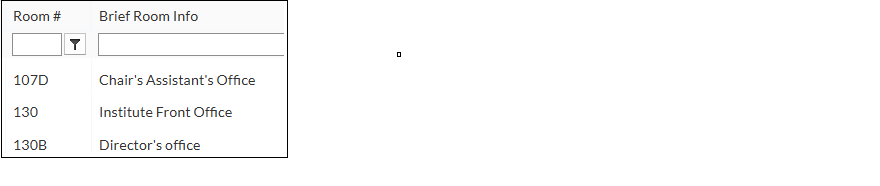
Figure 2. Descriptive brief room info comments which describe the activity in the room rather than the name of specific individuals may require fewer updates.
Note that entering anything into the Brief Room Info field is entirely optional. The Brief Room Info option is there for your convenience. The information entered is visible to other users of the system and may be transferred to other university computing systems.
This information can be exported to Excel using the report...
Room Seat Assignments
Also not at all required for the completion of the mandatory annual updates to the information in the facilities inventory system is assigning people to rooms. In the FMS:Workplace, linking a person to a room is called a "seat assignment".
It is possible to assign to each room one or more people who use the room during the year and to assign any one person to multiple rooms. If you do this, then there are two additional features of the inventory system which you may find useful.
Note that if you enter this information, please be prepared to keep it current each year. Adding seat assignments is not required to complete the facilities inventory.
[Instructions for entering and removing seat assignments]
Floor Plans Can Show Seat Assignments
The first feature which uses set assignments when they have been set is a floor plans which lists the seat assignments for each room.
[picture of floor plan with people assigned]
Figure 3.
You can export a copy of the floor plan with the names of the room occupants listed. Note that facilities inventory floor plans contain only fixed walls, not moveable cubicle walls, and so this feature will not be very useful in large spaces divided by cubicle walls.
[Instructions for displaying and saving floor plans listing seat assignments]
Oracle Analytics Server (OAS) Report Can List Seat Assignments
And the second capability, useful especially if you are working with rooms with organized research activities, is that it is possible to export from Oracle Analytics Server, OAS, a report which lists the room-use details as well as the seat assignments for the occupants of the room. This report may save you time when preparing your organized research substantiation reports for the Office of Cost and Capital Assets.