
Facilities Inventory: Download Research Accounts Report
Last updated: May 30, 2024
These instructions describe how to download a copy of the "Research Accounts Report" from Oracle Analytics Server (OAS). A current copy of this report is required as part of the "Research Substantiation Workbook" for each department which has rooms with sponsored research activities.
All users with active access to the facilities inventory system also have access to the associated reports in Oracle Analytics Server (OAS).
Login to Oracle Analytics Server
Log in with your Cornell NetID and NetID password to the Oracle Analytics Server (OAS) web site:
https://oasprod.db.cornell.edu/analytics [Cornell NetID and facilities inventory access required]
Locate the "Facilities Inventory Research" Dashboard
In the Oracle Analytics Server (OAS) web pages, in the upper right corner, select "Dashboards" as shown in Figure 1 below. From the list of dashboards to which you have access look for the IWMS category, underneath which is the "Facilities Inventory Research" subject area.
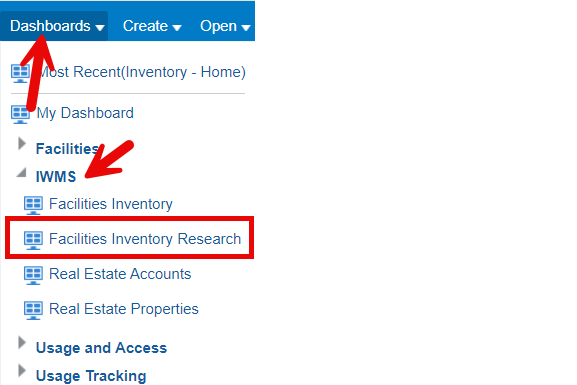
Figure 1. The Oracle Analytics Server (OAS) Dashboards list contains a category called "IWMS" underneath which is a listing for "Facilities Inventory Research".
Having selected the "Facilities Inventory Research" option, you should see a list of reports across the top of the screen. From this list, select " ".
Filtering the Report
By default, the report shows information for the current fiscal year.
Downloading the Report